> For the complete documentation index, see [llms.txt](https://cgps.gitbook.io/pathogenwatch/llms.txt). Markdown versions of documentation pages are available by appending `.md` to page URLs; this page is available as [Markdown](https://cgps.gitbook.io/pathogenwatch/getting-started/sign-in.md).
# Sign in
## Sign in / Sign out
While you are free to browse Pathogenwatch anonymously, there are limitations for anonymous users (e.g. you must be signed in to Create Collections or to upload genomes/reads).
#### SIGN IN
We provide a variety of sign-in (login) methods, including OAuth via Google, Microsoft and Apple accounts and via direct email login. Some methods can be specific to certain initiatives (e.g. the CLIMB authentication method). These initiative-specific sign-ins provide those users with customised versions of the Pathogenwatch application.
{% hint style="danger" %}
Your account will be created the first time you sign in, and is linked to the sign-in method you used. The same email address cannot be associated with multiple sign-in methods.
{% endhint %}
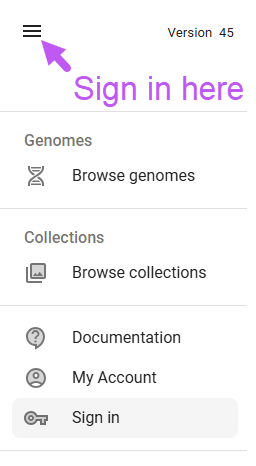
Access the sign-in page
* from the "Hamburger Menu" on the top left
* from the "My Account" page on the top right.
#### SIGN OUT
Within the application, you can access the sign out page via the  Hamburger menu icon in the upper left corner.
Continue to Tutorial
Hamburger menu icon in the upper left corner.
Continue to Tutorial