> For the complete documentation index, see [llms.txt](https://cgps.gitbook.io/pathogenwatch/llms.txt). Markdown versions of documentation pages are available by appending `.md` to page URLs; this page is available as [Markdown](https://cgps.gitbook.io/pathogenwatch/how-to-use-pathogenwatch/collections/using-the-icv/legend-labels-and-colours.md).

# Legend, Labels, and Colours

Show the Legend

The Legend shows the colours for all active entries in your "[Colour column](#change-the-colour-column)", as well as any [Metadata Blocks](/pathogenwatch/how-to-use-pathogenwatch/collections/using-the-icv/tree-panel/tree-panel.md#adding-and-editing-metadata-blocks) you've added to your Tree.

<table data-header-hidden><thead><tr><th width="345"></th><th></th></tr></thead><tbody><tr><td><p>Click the “Legend” tab on the side panel to show/hide the legend.</p><p>The Legend shows the colours and shapes for all active entries on the dashboard.</p><p>The Colour Column is listed first, followed by other active columns (e.g. Metadata Blocks)</p></td><td><img src="https://3802074513-files.gitbook.io/~/files/v0/b/gitbook-x-prod.appspot.com/o/spaces%2FHXfIP1DQQRf1INOFCCsK%2Fuploads%2FGbvweGKbozmKa3FhtsvF%2Flegend.png?alt=media&amp;token=27c43272-659b-447a-94f3-f3999845a5c4" alt="" data-size="original"></td></tr></tbody></table>

## Change the Labels

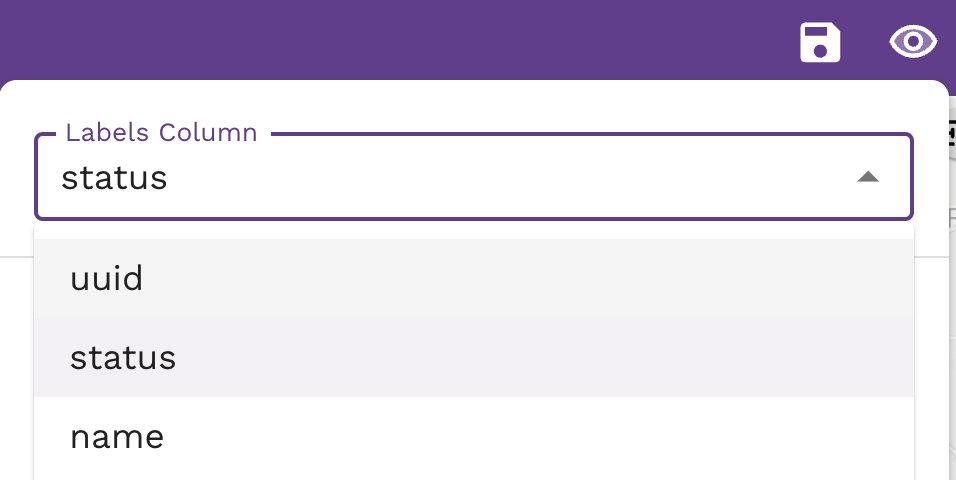
Labels affect which field is displayed on **tree leaf nodes**. Select the Label Column dropdown under the Labels, Colours, and Shapes menu icon (the eye <img src="https://3802074513-files.gitbook.io/~/files/v0/b/gitbook-x-prod.appspot.com/o/spaces%2FHXfIP1DQQRf1INOFCCsK%2Fuploads%2FMfzvI3p9MsCPmzWgLQwG%2Feye.png?alt=media&amp;token=afb27a4f-8ac0-4ed2-98f2-610501de2c24" alt="" data-size="line">) and choose the column to use for labels. <img src="https://3802074513-files.gitbook.io/~/files/v0/b/gitbook-x-prod.appspot.com/o/spaces%2FHXfIP1DQQRf1INOFCCsK%2Fuploads%2Fgit-blob-a57b5c69087125b12f2275e857b53edc5db5bff3%2Flabelscolumn.png?alt=media" alt="" data-size="original">
## Change the colour column

The Colour Column is the field used to colour **map markers, tree nodes, and timeline blocks.** Any column can be used to colour these panels.

One way to investigate your data is to change the Colour Column to see if any patterns in your data emerge, such as viewing the virulence\_factor across genomes. Click on the eye icon in the upper right corner of the dashboard and select a new Colour Column. or click on a column header in any of the Data Tables to quickly choose that as the Colour Column.

### Customise your columns' colour palettes

By default, most columns will use the DEFAULT colour palettes, but this may not be ideal for displaying multiple **metadata blocks**, since the default palette will be the same for many columns.

* Set a column as the Colour Column to change its colour palette. Do this sequentially for all columns you want to alter.
* Colour palette settings persist even when a column is no longer displayed or set as the Colour Column.

When a column is set as the Colour Column, select the "Colour Palette" option. "Palette type" defaults to "all" which means the type is auto-selected.

* By default, most columns will use a categorical colour palette with 24 qualitative colours.
* Columns with **continuous data** (e.g. "No. Contigs") can be coloured continuously using a gradient
* Colour palettes can be **re-used** for other columns which contain the same values.

**Quick palette changes**

<img src="https://3802074513-files.gitbook.io/~/files/v0/b/gitbook-x-prod.appspot.com/o/spaces%2FHXfIP1DQQRf1INOFCCsK%2Fuploads%2Fgit-blob-53bcf60b87b91ce97173062bf49fcc7514442ddc%2Fbulb.png?alt=media" alt="" data-size="line"> Tip - Changing the "Palette type" and/or the "Number of colours" is a quick way to get new palette options when there are limited column values.

#### Palette types & Number of colours

**Standard columns**

Diverging: <= 11\
Qualitative: <= 24\
Sequential: <= 9\
Singlehue: <= 9\\

Comparing default colour options in Palette types: ![](https://3802074513-files.gitbook.io/~/files/v0/b/gitbook-x-prod.appspot.com/o/spaces%2FHXfIP1DQQRf1INOFCCsK%2Fuploads%2FdJRJWPHMEqhkfOg3LIs5%2Fcolour-palettetypes-default-options.png?alt=media\&token=81b7a3f2-6374-492d-bed2-4c75d1cc6e58)

**Numeric Gradient palettes**

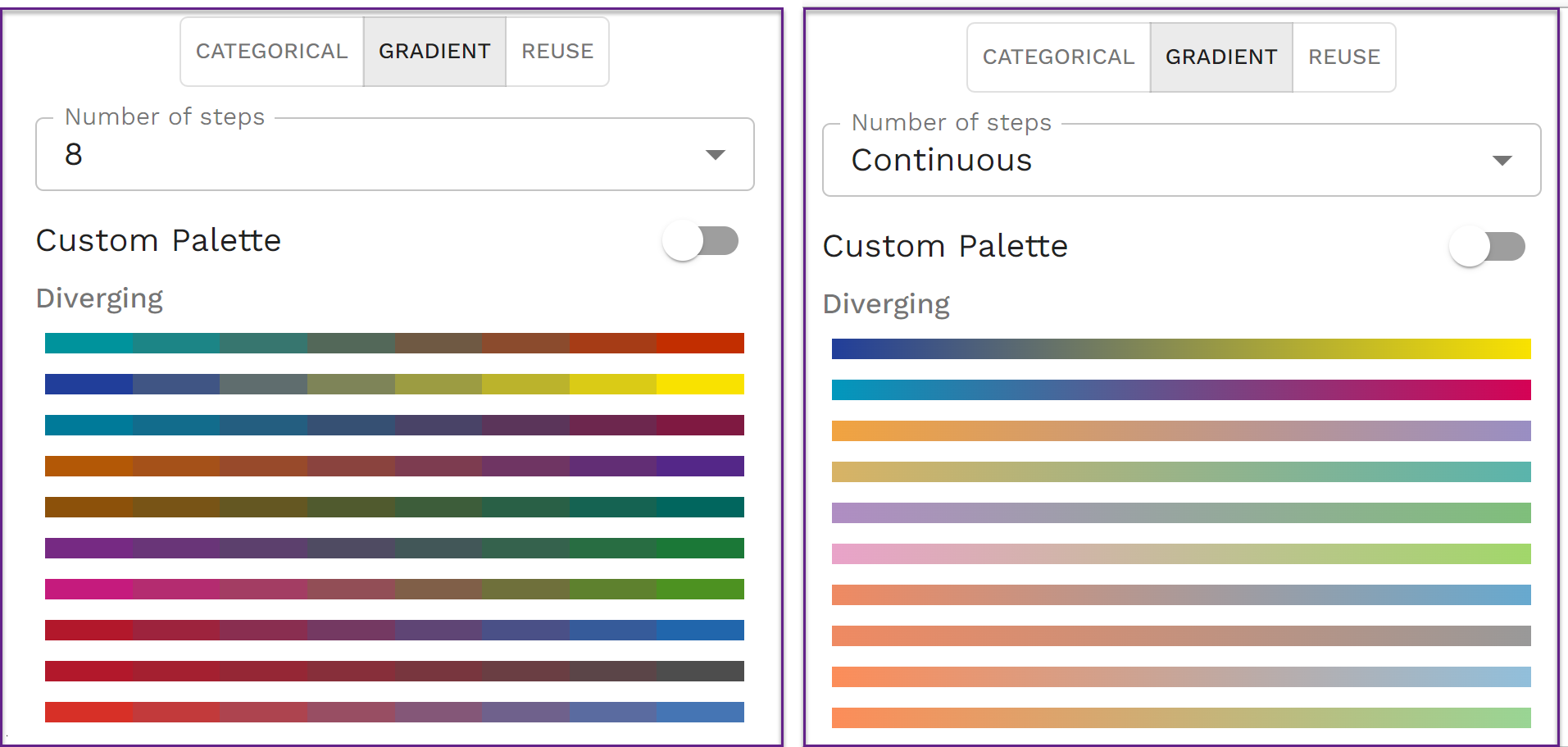
Number columns can use a colour gradient, either continuous or from 3-24 steps.
<figure><img src="https://3802074513-files.gitbook.io/~/files/v0/b/gitbook-x-prod.appspot.com/o/spaces%2FHXfIP1DQQRf1INOFCCsK%2Fuploads%2FC0Ui3j5cmiKuPeAVNxLy%2Fcolour-palette-gradient.png?alt=media&amp;token=7ce2f500-7148-40e8-b6a5-4508fb42e066" alt="" width="375"><figcaption></figcaption></figure>

#### Custom Palette

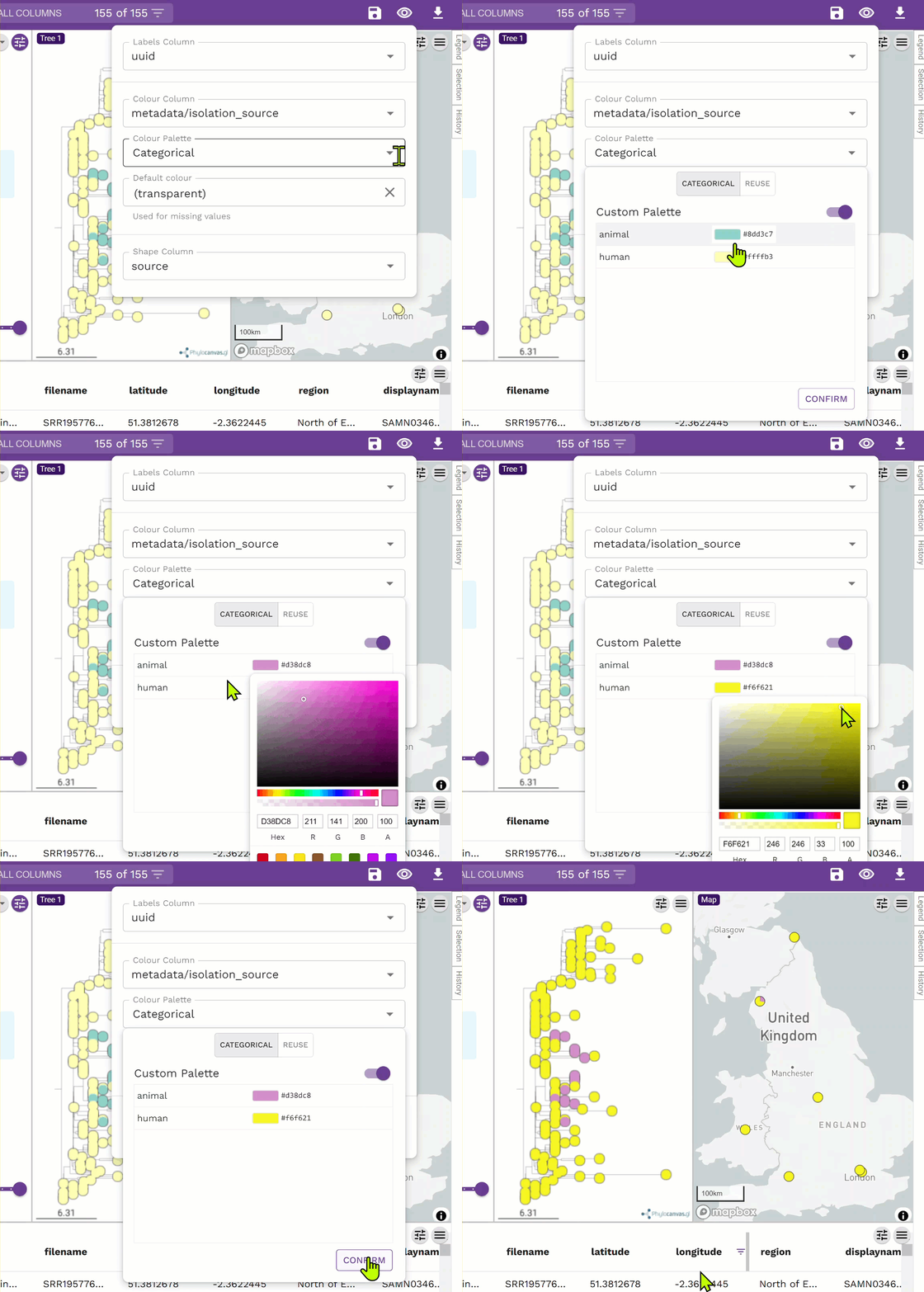
* You can alter palettes beyond the default options by adjusting individual colours in the palette.
* You can **REUSE** custom palettes across columns with shared values (e.g. data\_owner & submitting\_org, or name & metadata/NAME) instead of manually setting each colour for both columns.
* Gradient palettes can be customised by changing the individual steps or the continuous start and stop boundaries.

<table data-header-hidden><thead><tr><th width="268"></th><th></th></tr></thead><tbody><tr><td><p>Toggle on the "Custom Palette", then click on each colour box in turn and choose a desired colour.<br><br><img src="https://3802074513-files.gitbook.io/~/files/v0/b/gitbook-x-prod.appspot.com/o/spaces%2FHXfIP1DQQRf1INOFCCsK%2Fuploads%2FNiF3Pirf7xwKTbTAM6Da%2Fcaution.png?alt=media&amp;token=71e8a9bc-41d9-4459-ad2d-e4637d64ab7e" alt="" data-size="line">You MUST click the "CONFIRM" button before leaving this dialog box!</p><p><img src="https://3802074513-files.gitbook.io/~/files/v0/b/gitbook-x-prod.appspot.com/o/spaces%2FHXfIP1DQQRf1INOFCCsK%2Fuploads%2FoHF4lIADUCQYnQIEBMal%2Fconfirm.png?alt=media&amp;token=c5dc99e9-cbce-4f1d-a418-dd9b25cd2b5f" alt="" data-size="original"></p><p>Click the white space next to the colours, or on the colour box you have just set, and then click CONFIRM.</p></td><td><img src="https://3802074513-files.gitbook.io/~/files/v0/b/gitbook-x-prod.appspot.com/o/spaces%2FHXfIP1DQQRf1INOFCCsK%2Fuploads%2F6cqdhW3HzCn90P08rbxO%2Fset-colour-palette.gif?alt=media&amp;token=2ba71ebb-c9ca-4b8c-930b-e6921e467139" alt="" data-size="original"></td></tr></tbody></table>